Project Services · Resource Scheduling · NetSuite Native

AVT Resource Management for NetSuite

Manage and schedule resources in one system. Drag-and-drop scheduling, interactive Gantt charts, Google and Outlook calendar integration and a mobile time tracking app — all natively inside NetSuite.

AVT Resource Management for NetSuite
📅
Drag-and-Drop Scheduling
📊
Gantt Chart Visualisation
📱
Mobile Time Tracking
📅
Google & Outlook Calendar
👥
Utilisation Tracking
Why AVT Resource Management

Manage Every Resource. Deliver Every Project.

AVT Resource Management gives project and operations managers a single, unified view of every resource across every project — replacing fragmented spreadsheets and manual scheduling with a live drag-and-drop system inside NetSuite.

👥
Manage Resources in One System
Assign, schedule and track internal and external resources across projects, cases, customers and work orders — all from a single interface in NetSuite.
📈
Enhance Service Delivery
Visual workload tracking and utilisation analytics give managers the real-time visibility they need to identify conflicts and optimise resource allocation before problems occur.
Decrease Operational Costs
Automated staff allocation based on competencies, automated overdue task alerts and bulk task management eliminate the administrative overhead of manual project coordination.
📊
Boost Productivity
Drag-and-drop scheduling with auto-scheduling in 15, 30 and 60-minute increments — with planned vs. actual tracking keeping every project on time.
📱
Mobile Time Tracking
Field and project resources clock in/out, capture time and view task assignments from tablets and mobile devices — live in NetSuite without extra infrastructure.
📅
Google & Outlook Integration
Two-way calendar sync — resources accept or decline assignments directly from Google or Outlook calendar, with NetSuite updating automatically.
Core Capabilities

Three Integrated Resource Modules

AVT Resource Management combines drag-and-drop scheduling, Gantt visualisation and calendar integration in one cohesive platform inside NetSuite.

Resource Scheduling
Gantt & Workload
Calendar Integration

Drag-and-Drop Resource Scheduling

A visual, drag-and-drop scheduler lets managers assign resources across projects, cases and work orders — with auto-scheduling in 15, 30 and 60-minute increments and bulk assignment by competency.

  • Drag-and-drop scheduling in 15, 30 and 60-minute increments
  • Auto-scheduling and bulk staff assignment by competency
  • Work sourcing from Projects, Cases, Customers and Work Orders
  • Planned vs. actual duration tracking per resource
  • Automated overdue task alerts and allocation notifications
  • Multi-attribute filtering (up to 4 criteria) for resource search
  • Right-click copy, paste and delete for rapid schedule changes
📅
Resource Scheduling Board

Gantt Charts & Workload Tracking

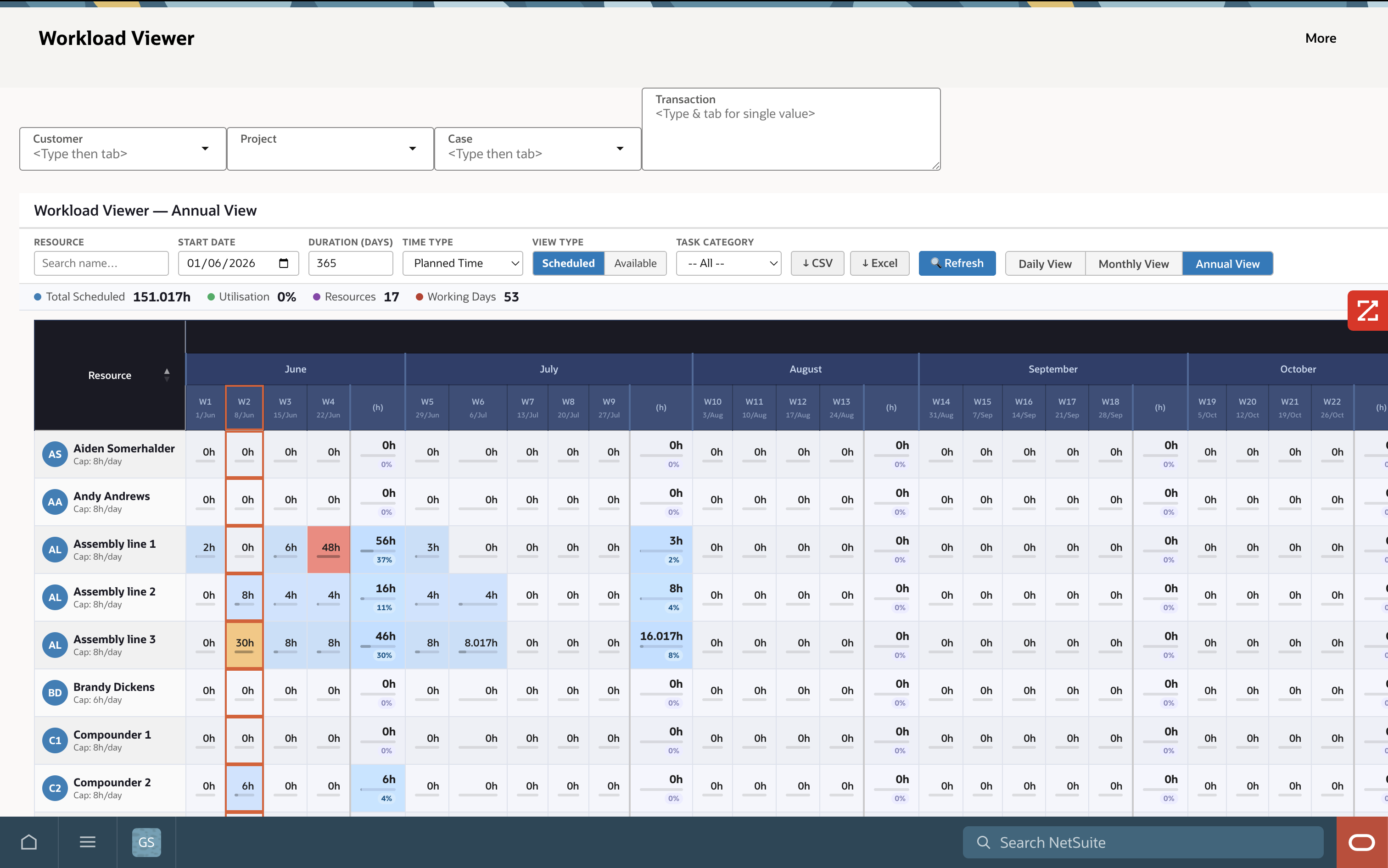
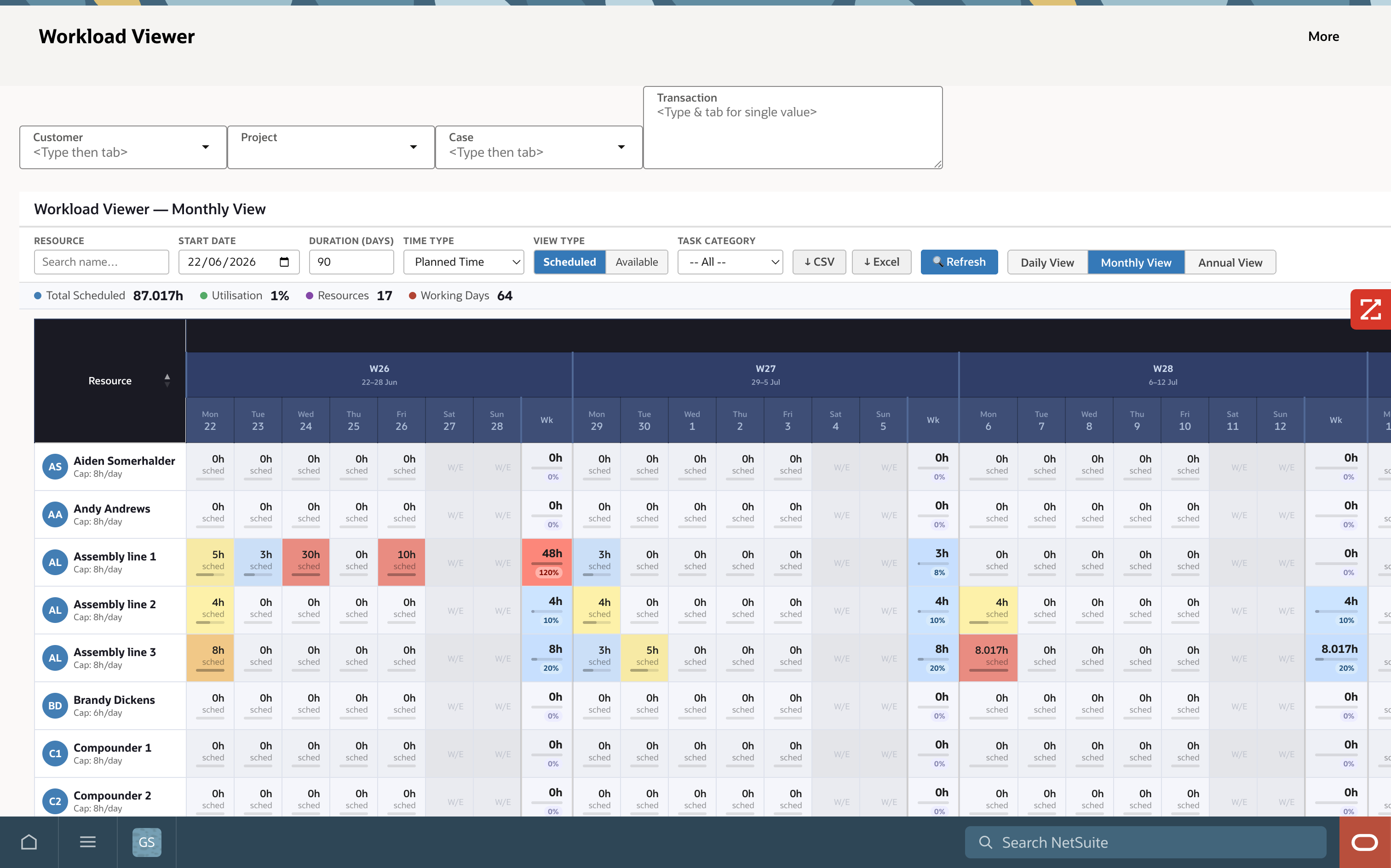
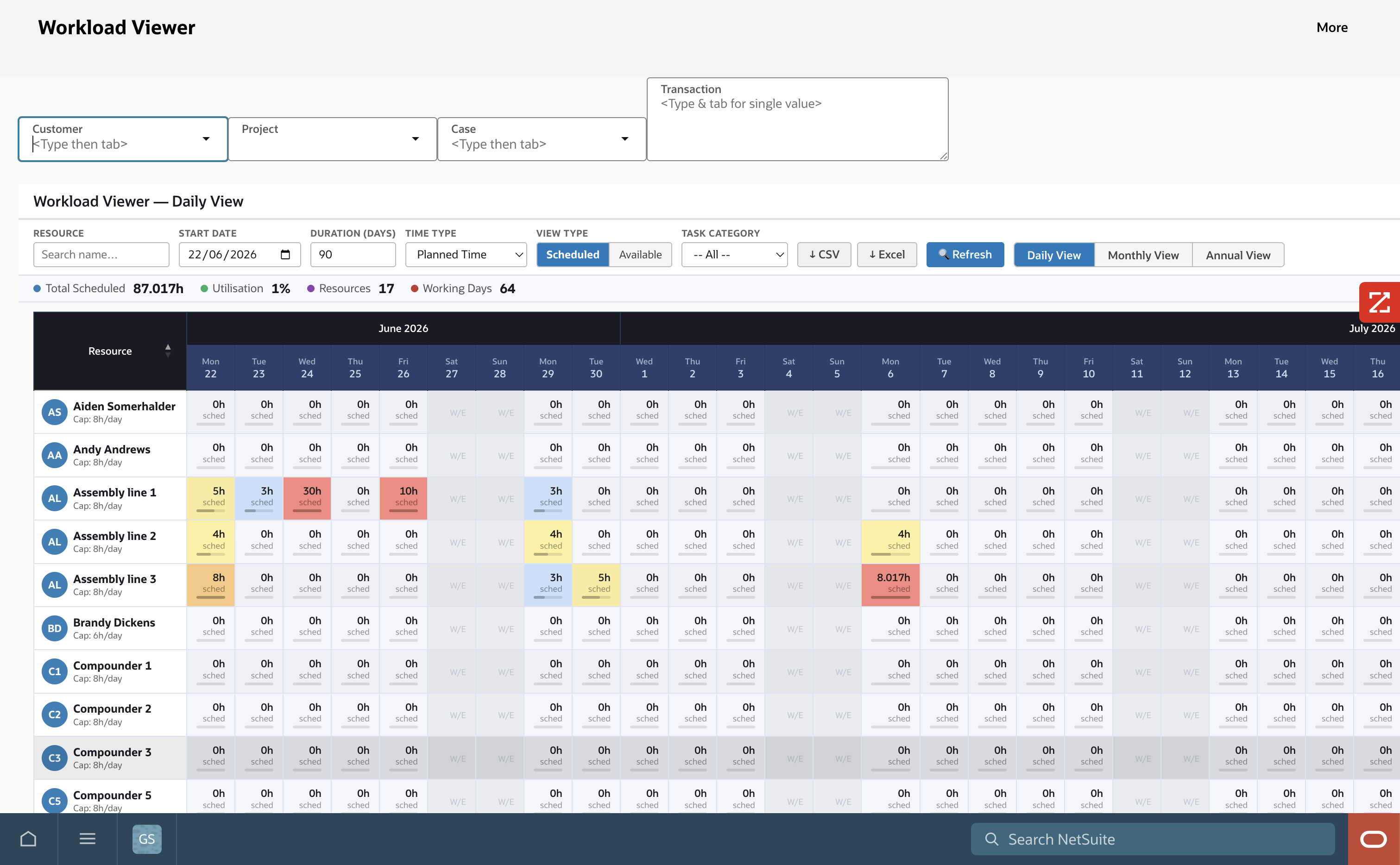
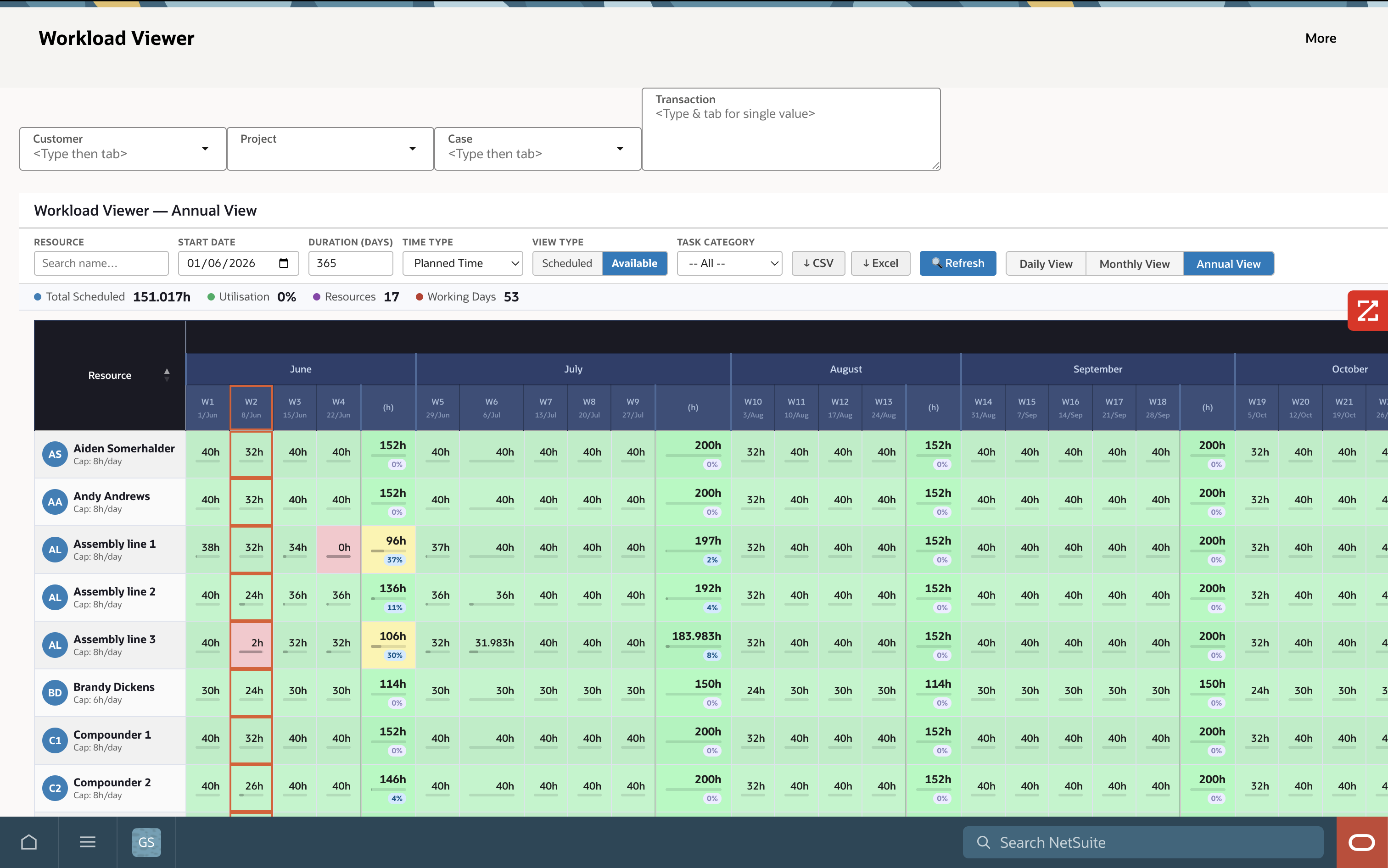
Interactive Gantt charts give managers a visual project timeline with task drill-down, milestone tracking and colour-coded workload visualisation — with conflict identification built in.

  • Interactive Gantt chart with monthly, weekly, daily and annual views
  • Task drill-down and milestone tracking
  • Colour-coded workload visualisation with business-rule alerts
  • Simultaneous planned and actual workload monitoring
  • Conflict identification and resolution tools
  • Customer-facing project visibility sharing
  • Resource Viewer with daily, weekly and monthly utilisation views
📊
Gantt Chart Visualisation

Calendar Integration

Two-way synchronisation with Google Calendar and Microsoft Outlook — resources can accept or decline bookings directly from their calendar, and customers receive project updates via shared calendar invites.

  • Google Calendar two-way synchronisation
  • Microsoft Outlook Calendar integration (Beta)
  • NetSuite scheduler-to-calendar syncing
  • Acceptance and denial tracking from calendar invites
  • Customer booking acceptance via calendar invite
  • External calendar link generation and sharing
📅
Calendar Sync Interface
How It Works

From Assignment to Delivery in Four Steps

AVT Resource Management connects your project pipeline to your people — from resource assignment through to time capture and delivery tracking, all inside NetSuite.

1
Assign Resources
Drag-and-drop resources onto projects, cases and work orders — bulk assign by competency or availability.
2
Sync to Calendar
Assignments sync to Google or Outlook — resources accept or decline bookings directly from their inbox.
3
Track Time
Resources clock in/out via mobile, capture time against tasks and add notes — live in NetSuite.
4
Monitor & Report
Managers track planned vs. actual, resolve conflicts and report utilisation across the full resource pool.
Works with
NetSuite Advanced Projects
NetSuite CRM Cases
Google Calendar
MS Outlook Calendar
AVT Project Time Tracking
Client Results

What Our Clients Say

See AVT Resource Management in Action

We will walk you through a live demo inside NetSuite — covering scheduling, Gantt charts, calendar sync and mobile time tracking tailored to your team and project types.

  • Drag-and-drop scheduling board demonstration
  • Gantt chart and workload tracker walkthrough
  • Google and Outlook calendar sync demonstration
  • Mobile time tracking app walkthrough
  • Typical implementation timeline: 3-5 weeks

Book Your Resource Management Demo

Ready to Transform Your Resource Scheduling?

Join 100+ companies using AVT SuiteApps to automate, integrate and optimise their NetSuite ERP.

Request a Demo Browse All SuiteApps